Identify on device
Use the camera or selected photos without sending every image away for recognition.
Helio app · iPhone
Safari Go identifies supported wildlife on device, keeps a local field journal, and lets travellers use destination content offline after a pack is installed.
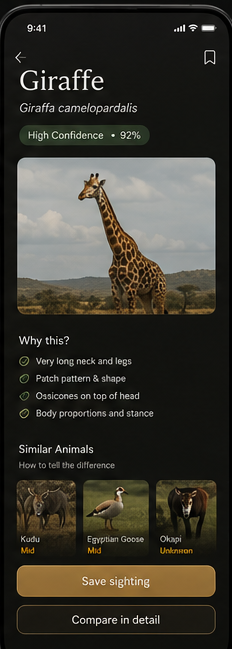
Start from an intentional camera capture or a photo. Safari Go checks the supported wildlife set on device, returns a result with a confidence state, and keeps the sighting in a local field journal.
Installed destination content remains available offline. Network access is reserved for pack downloads, trial state, entitlements, and purchases.
Safari Go is an iPhone product; support depends on the device, installed version, available destination content, and the supported wildlife set.
Use the camera or selected photos without sending every image away for recognition.
Save sightings, notes, behaviour, and thumbnails in a local field journal.
Safari Go focuses on one primary animal in one photo and shows confidence rather than forcing certainty.
Experience the core camera and photo workflow before paying.
Unlimited on-device Animal ID for supported species.
Destination-specific field-guide cards and offline content remain separate from Animal ID.